
Time normalization
Rounding rules
Build reusable minute-rounding policies and apply them through the organisation hierarchy.
Inside the workspace
See Rounding rules in use.
Real EasyClock screens with demonstration data. Open a screenshot to see the interface at full size.
 View full size ↗
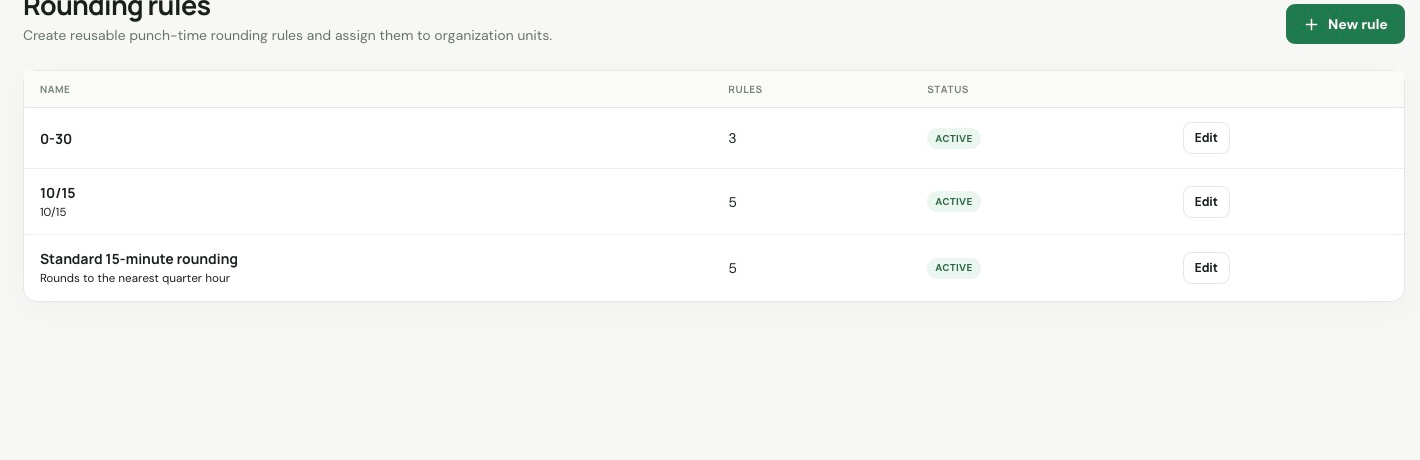
Maintain reusable rounding policies
The catalogue shows each rule’s name, description, number of minute ranges and status.
 View full size ↗
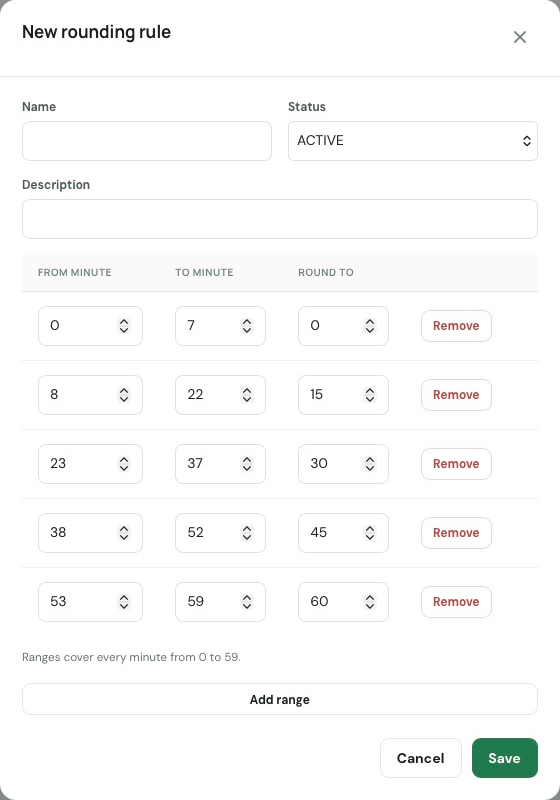
Cover every minute of the hour
The editor maps From minute and To minute ranges to a rounded minute and checks complete coverage from 0 through 59.
Step by step
Try this workflow.
Name the policy
Use a clear name and description so administrators can recognise the intended rounding behaviour.
Define the minute ranges
Cover every minute from 0 to 59 without gaps or overlaps, selecting the target rounded minute for each range.
Assign it through the organisation
Apply the rule to the appropriate unit and review inheritance or explicit no-rounding choices for its children.
Review calculated time
Check representative punch times and recalculated work sessions before relying on the policy for payroll preparation.
Rule design
- Name and describe the rule, then set its active status.
- Map input minute ranges from 0–59 to a rounded minute from 0–60.
- Ranges must cover the full hour without overlaps or gaps.
Assignment
- Assign the rule to an organisation unit.
- Choose inherited policy from the parent or explicitly choose no rounding.
- Review effective assignment before recalculating historical time.