
Calculation policy
Pay groups
Combine pay-period dates, break handling, clocking rules, exceptions, overtime and approval behaviour for a group of employees.
Inside the workspace
See Pay groups in use.
Real EasyClock screens with demonstration data. Open a screenshot to see the interface at full size.
 View full size ↗
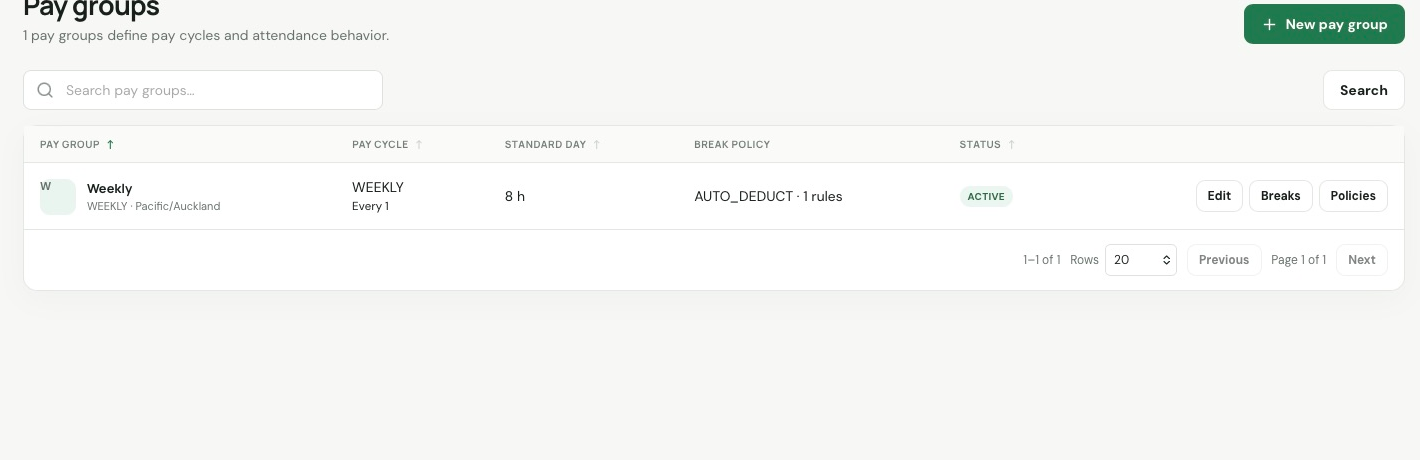
Review the pay-cycle catalogue
Each Pay Group summarises its cycle, standard day, break-policy type and active status.
 View full size ↗
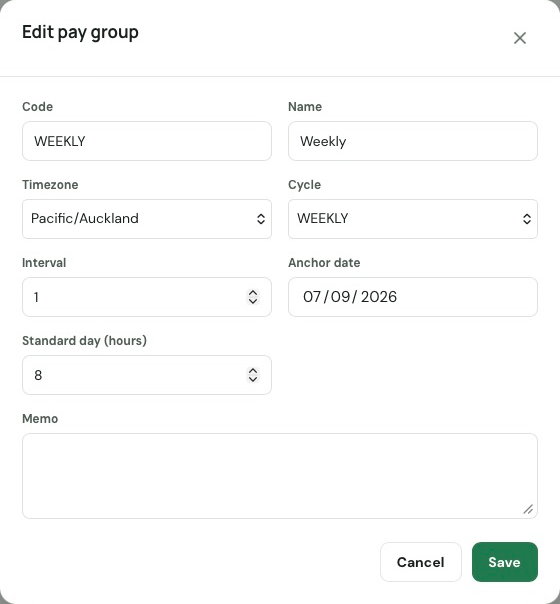
Define the cycle and anchor date
The editor brings together code, timezone, cycle, interval, anchor date and standard daily hours.
Step by step
Try this workflow.
Define the pay cycle
Create or edit the Pay Group, confirming its timezone, cycle, interval and anchor date.
Review the break configuration
Open Breaks to maintain the deduction or break rules that apply to the group.
Review calculation policies
Use Policies to inspect overtime, public-holiday, leave and other calculation choices relevant to the business.
Assign and verify
Assign employees from the correct effective date, then check a representative timesheet period before using the calculated totals for payroll.
Pay period
- Weekly, fortnightly, monthly or custom cycle and interval.
- Timezone, anchor date, monthly start day and standard day hours.
- Assign employees effective from the correct date.
Breaks and clocking
- No calculation, automatic deduction or clocked breaks.
- Base deductions on elapsed session, scheduled duration or clocked work.
- Configure tolerance, clock-out requirements, minimum enforcement and multiple break rules.
Time policy
- Shift matching, clock-in and clock-out grace and attendance thresholds.
- Public holiday and leave treatment.
- Pay Type selections may remain None when overtime calculation is disabled; enabling overtime requires both a Regular and an Overtime type.