Workforce records
Employees
An employee is the effective-dated workforce record used by time, schedules, leave and payroll—not automatically a login account.
Inside the workspace
See Employees in use.
Real EasyClock screens with demonstration data. Open a screenshot to see the interface at full size.
 View full size ↗
Create the workforce record
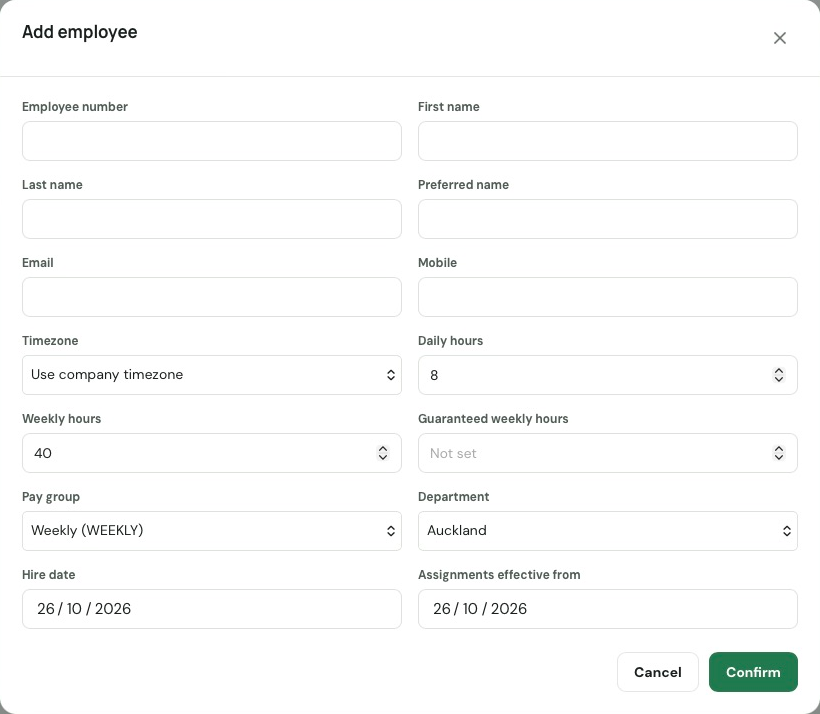
The employee form combines identity, working hours, Pay Group, department and effective dates. Contact fields are blank in this example.
Step by step
Try this workflow.
Enter the employee identity
Use a unique employee number and the person’s legal name; add preferred name and contact information where needed.
Confirm the working hours
Review daily, weekly and guaranteed weekly hours, plus any employee-specific timezone.
Assign the policy and team
Select the Pay Group and department, then set the hire date and the date those assignments take effect.
Add login access separately
Create or link a User when the employee needs to sign in. The employee record and login identity have different responsibilities.
Employee details
- Employee number, legal and preferred name, email, mobile and timezone.
- Daily, weekly and guaranteed weekly hours.
- Hire date and employment-effective dates.
Assignments
- Assign the Pay Group and organisation unit that apply from an effective date.
- Move an employee between units without losing assignment history.
- Terminate employment while preserving historical attendance and payroll records.
Related access
- Create a separate User only if the employee needs to sign in.
- Link that User to this employee for Self-scoped access.
- Employee status affects operational selection lists.