
BI
Plan and capacity
Billing & plan
Understand the active subscription, employee capacity and which advanced modules are available.
Inside the workspace
See Billing & plan in use.
Real EasyClock screens with demonstration data. Open a screenshot to see the interface at full size.
 View full size ↗
See plan availability and employee capacity
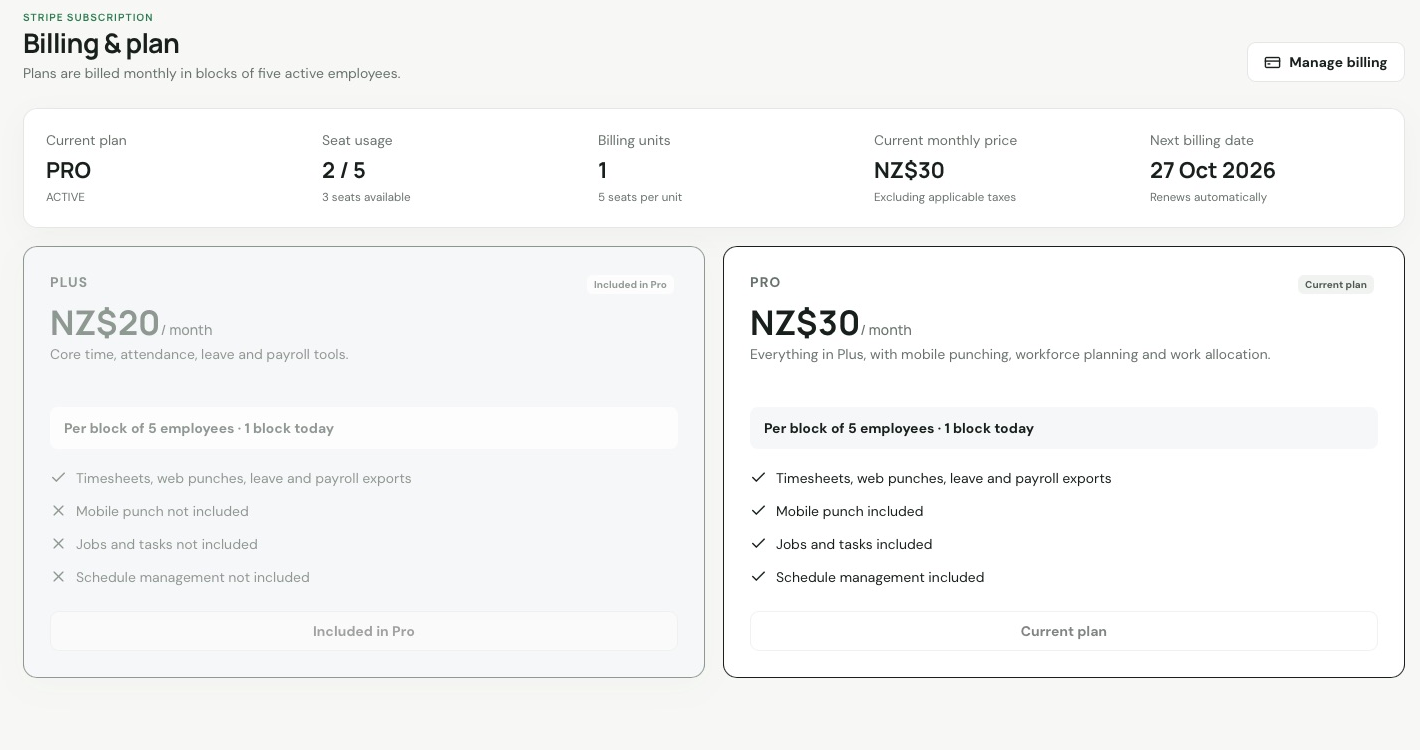
Billing & plan displays the current plan, seat usage, billing units, renewal context and the capabilities included in each plan.
Step by step
Try this workflow.
Check the current plan
Read the plan and subscription status before investigating a plan-specific feature.
Review employee capacity
Compare active-employee usage with the available seats and billing units.
Compare included capabilities
Use the plan cards to understand mobile punching, scheduling and work-allocation availability.
Use the billing portal when needed
An authorised administrator can open Manage billing to review the subscription and payment arrangements.
Subscription
- Review plan, seat usage, billing units, estimated monthly price and current period end.
- EasyClock bills monthly in blocks of five employees.
- Add capacity, manage billing or resume automatic renewal.
Plan features
- Plus includes core timesheets, web punching, leave and payroll functions.
- Pro adds mobile punch, Jobs, Tasks and scheduling.
- A subscribed feature must still be turned on in Company settings before it appears.