OV
Workspace
Overview
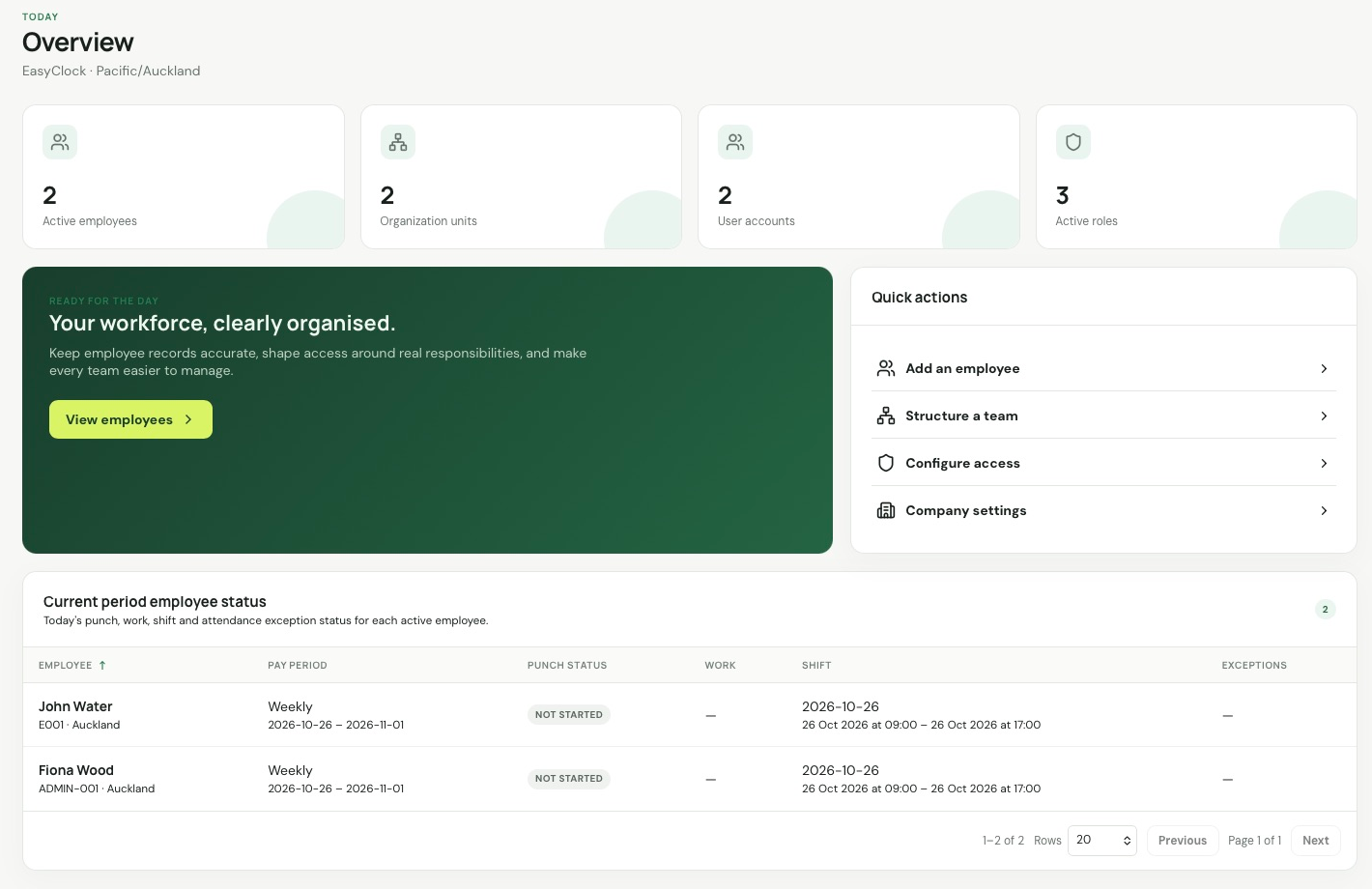
The operational home page for a quick picture of the current pay period and employee attendance.
Inside the workspace
See Overview in use.
Real EasyClock screens with demonstration data. Open a screenshot to see the interface at full size.
 View full size ↗
Start with the current workforce picture
Summary cards, quick actions and the current-period employee table bring attendance context into one view.
Step by step
Try this workflow.
Check the headline counts
Review active employees, organisation units, user accounts and roles before opening a detailed module.
Read the employee status table
Compare the employee’s pay period, punch state, current work, scheduled shift and exceptions.
Open the relevant workspace
Use the quick actions or navigation to review employees, organisation structure, access or company settings.
Review within your scope
The employees and records you can open follow your account’s permissions and organisation scope.
What you can see
- Headline attendance and timesheet statistics.
- Each accessible employee’s punch state, current Job and Task, scheduled shift and exception status.
- Quick links to common actions.
How access works
- Results follow the user’s role and data scope.
- Employees see their own information; managers can see permitted organisation units.
- Refresh updates the current operational view.